
Synthesis Machines
Drum
General information
The Drum Machine is a per-voice drum-synth: each voice runs a single drum model, triggered on note-on with a percussive envelope. Most models have no looping or sustain stage — the Decay parameter sets the length of every hit. (The Glitch model is the exception: at Decay 100 % it sustains as a continuous drone for as long as the note is held — see Glitch model below.) 15 drum models are available, covering kicks, snares, hi-hats, claps, plus FM, Noise and Glitch sources.
The Machine has its own dual-mode signal chain: every drum hit goes through a Filter section, then a Drive stage, then an output Volume with Accent before reaching the Mixer. The Filter and Drive are integrated into this Machine — they are not the unified Filter/Amp sections used by the Synthesizer.
flowchart LR
    MOD["DRUM MODEL
(15 models, BD/SD/HH/CP/FM/Noise/Glitch)"]
    FILT["FILTER
(single slot)"]
    DRV["DRIVE"]
    VOL["VOLUME + ACCENT"]
    OUT["TO MIXER"]

    MOD --> FILT
    FILT --> DRV
    DRV --> VOL
    VOL --> OUT

    classDef src fill:#06b6d4,stroke:#22d3ee,color:#fff,stroke-width:2px
    classDef filter fill:#65a30d,stroke:#a3e635,color:#fff,stroke-width:2px
    classDef drive fill:#eab308,stroke:#facc15,color:#000,stroke-width:2px
    classDef vol fill:#ec4899,stroke:#f472b6,color:#fff,stroke-width:2px
    classDef mixer fill:#9333ea,stroke:#c084fc,color:#fff,stroke-width:2px

    class MOD src
    class FILT filter
    class DRV drive
    class VOL vol
    class OUT mixer
The Machine is fully polyphonic: trigger different voices simultaneously to layer hits. There are no choke groups — every voice rings out independently for the duration of its Decay envelope.
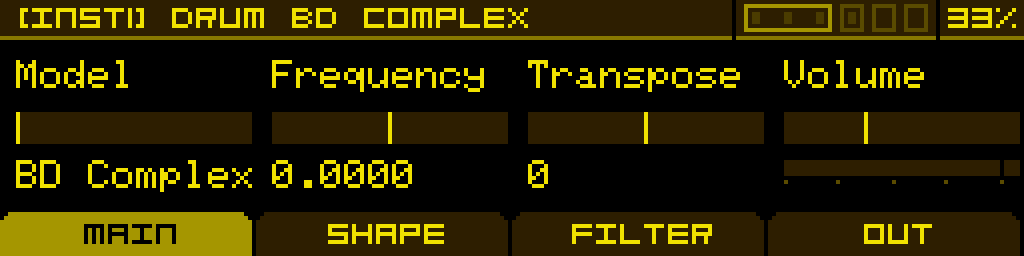
MAIN tab
| Model | Frequency | Transpose | Volume |
| Selects the drum model. 15 choices — see Drum models below. | Fine-tune the pitch. | Tune the pitch in semitone increments. | Output level into the Filter stage. |
SHAPE tab
The SHAPE tab adapts to the selected model. Decay is always present on Button 1 and controls the length of the hit; the other buttons and pages change with the model. Every parameter on this tab triggers the on-screen waveform preview (the DrumWave view) so you can audition the shape of the hit while editing.
See Drum models below for the per-model parameter list.
FILTER tab
A single filter slot per voice. The same dual-mode filter family as the Synthesizer: 31 filter types selectable via Type, with Cutoff, Res and a third button that follows the filter type:
| Cutoff | Res | Trans / Gain / Feedback | Type |
| Filter cutoff frequency. | Filter resonance. | Context-sensitive: shows Trans for SVF 12, Gain for BELL EQ, Feedback for the TLD ladder family. Empty for filter types that don't expose a third parameter. | Selects the filter type. Set to Off to bypass the filter section entirely. |
OUT tab
| Drive Type | Drive Amount | Accent | Volume |
| Post-filter drive curve. Set to Off to bypass the drive stage. Same drive list as the Synthesizer. | Drive intensity (0–100%). Disabled while Drive Type is Off. | Per-hit accent. Modulate Accent (e.g. from a Shape sequencer or velocity) to add dynamics to a drum pattern. Modulating Accent affects both the level and the brightness/punch character of the hit. | Output level with VU meter. |
Drum models
15 models, organised by drum family. Each model has its own internal parameter set on the SHAPE tab — parameter counts vary from 2 to 9, spread across 1 to 3 pages.
| Model | Family | SHAPE pages | Per-model parameters |
| BD Complex | Kick | 3 | Decay · Curve D. · Shape · Punch · Sweep · SweepTime · ClickType · Click · Sub · Click Decay |
| BD Analog | Kick | 1 | Decay · Tone · Punch · Feed |
| BD Synth. | Kick | 2 | Decay · Tone · Dirt · FM · Click |
| BD FM | Kick | 2 | Decay · Ratio · Index · FM Decay · Feedback |
| BD Fold | Kick | 2 | Decay · Fold · Symmetry · Noise · Sweep |
| BD Acoust. | Kick | 2 | Decay · Tension · Strike · Beater · Shell |
| SD Analog | Snare | 1 | Decay · Tone · Snappy |
| SD Synth. | Snare | 1 | Decay · FM Amount · FM Decay · Snappy |
| SD Acoust. | Snare | 2 | Decay · Tuning · Wires · Stick · Shell |
| HH Metal | Hi-Hat | 1 | Decay · Tone · Noisiness |
| HH Synth. | Hi-Hat | 1 | Decay · Tone |
| CP Hand | Clap | 1 | Decay · Impact · Spread · Amount |
| FM | FM | 1 | Decay · Ratio · Index · Feedback |
| Noise | Noise | 2 | Decay · Color · Tone · Metal · Snap · Sweep · Reso · Chaos |
| Glitch | Glitch | 1 | Decay · Formula · Bit1 · Bit2 (see below) |
Glitch model
Glitch is a bytebeat / chiptune-style noise synth. Instead of a fixed algorithm, it exposes a Formula selector that picks one of 44 built-in bytebeat algorithms. The two Bit1 and Bit2 parameters tweak internal variables of the active formula — their meaning depends on the formula chosen.
The formulas are named after the timbre they actually produce at musical pitch (Chrome, FuzzSub, Pulse, Sizzle, Klang, Acid, Glass, Crush, Fold, Zap, PWM, Razor, Morph…) rather than after instruments, so browsing for a sound is direct.
On-screen formula. While you edit, the active bytebeat math expression is drawn right over the waveform, with the live Bit1 and Bit2 values substituted into it — the value you are currently turning is highlighted, so you can see exactly where each knob acts in the formula.
Infinite sustain. Set Decay to 100 % and the Glitch model stops behaving like a one-shot percussion: it holds as a continuous drone for as long as the note is gated, then releases smoothly (~50 ms) on note-off. Great for evolving textures, drones and pads built from raw bytebeat material.
Each Formula reacts differently to Bit1 and Bit2, so the most efficient way to explore is to pick a Formula, then sweep Bit1 and Bit2 while listening.
Tip: modulate the Formula parameter from a Shape sequencer or a Sample & Hold to step between glitch algorithms over time — gives evolving, never-quite-the-same percussion.