
Modulators
ADSR
The ADSR is an essential modulator for synthesis. In this case, it is a DAHDSR (Delay-Attack-Hold-Decay-Sustain-Release) envelope.
The main features of this ADSR are:
- 6-stage envelope (Delay-Attack-Hold-Decay-Sustain-Release)
- Configurable curve for Attack, Delay, and Release stages
- Multiple modes (Gate, Trig, Loop, and Gated Loop)
- The envelope can restart when retriggered before finishing (or continue)
- Like other modulators, the output gain can be modulated to function as a "Depth" parameter.
Keep in mind that every envelope parameter can be modulated, except those in the Settings tab, which define the envelope's behavior.
All values are displayed in %. Time values depend on the Range settings (Snap, Fast, Medium, Slow).
Main ADSR Screen
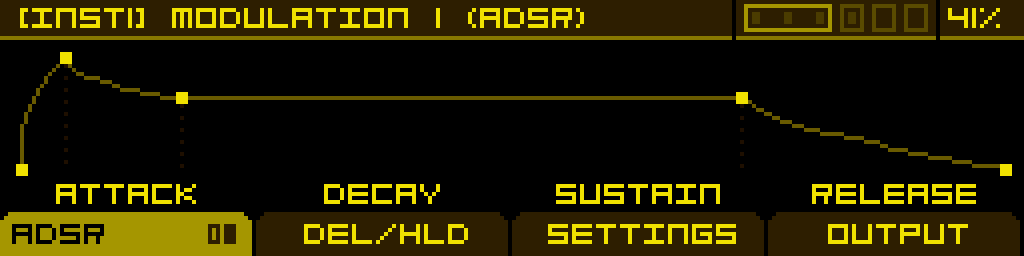
ADSR Tab
The ADSR tab consists of two pages, navigable by pressing the corresponding button (button 1).
Page 1 allows you to modify (and modulate) envelope times:
| Attack | Decay | Sustain | Release |
|---|---|---|---|
| Sets the time for the envelope to reach its peak level after the gate is activated (or a key is pressed in MIDI). | Sets the time for the envelope to drop to the Sustain level after Attack completes, while the gate remains high (or the key stays pressed in MIDI). | Defines the level at which the envelope remains as long as the gate is high (or the key is held in MIDI). | Sets the time for the envelope to return to its lowest level after the gate is released (or a key is released in MIDI).
If the gate is released before Decay (or Attack) finishes, the envelope directly starts the Release stage from its current level, skipping Sustain (or both Decay and Sustain). |
Page 2 allows you to modify (and modulate) envelope curves:
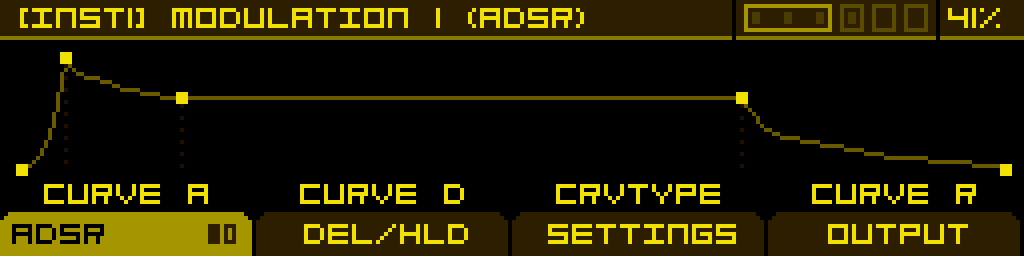
| Curve A | Curve B | - | Curve C |
|---|---|---|---|
| Sets the Attack stage curve, from Logarithmic to Linear to Exponential. | Sets the Decay stage curve, from Exponential to Linear to Logarithmic. | - | Sets the Decay stage curve, from Exponential to Linear to Logarithmic. |
Delay/Hold Tab
This tab allows you to add segments to the ADSR envelope:
| Predelay | Hold | - | - |
|---|---|---|---|
| Sets the delay time before the Attack stage starts ramping up after the gate is activated (or a key is pressed in MIDI). | Sets the time the envelope is held at its peak after Attack completes and before Decay starts. | - | - |
Settings Tab
This tab contains settings that define the envelope behavior. These settings cannot be modulated.
| Trigger | Mode | Range | Retrig |
|---|---|---|---|
| Defines the source that triggers the envelope: - Disabled - Any of the 6 Gate inputs - Voice trigger (note on) - Clock signals | Defines how the envelope responds to gate signals:
| Selects the time range for the envelope: - Slow - Medium - Fast - Snap (optimized for percussive sounds) | Restarts the envelope from the beginning if retriggered before completion. |
Render mode (Per Voice / Shared) — like every modulator, the ADSR can be set to Per Voice (one independent envelope per voice of the instrument) or Shared (a single envelope shared by every voice). Per-Voice is the default and is what you usually want for note-driven envelopes; switch to Shared for envelopes that should evolve identically across all voices, or to save CPU. Toggle the mode from the INSTRUMENT screen — focus the modulator slot, then press the PER VOICE / SHARED button in the footer.
Output Tab
A final gain stage for the envelope, which can be modulated:
| Gain | - | - | - |
|---|---|---|---|
| Adjusts the amplitude of the envelope signal, typically used for Velocity modulation.
-100% means no output. | - | - | - |