
Modulations System
Assign modulations
In the previous chapter, How modulations work, we saw how to assign a modulation to a parameter. As a reminder, press and hold one of the four buttons (1–4) located below the parameter you want to modulate. This opens the MOD ASSIGN screen, where every modulation source available for that parameter is exposed, plus advanced per-parameter settings.
MOD ASSIGN screen
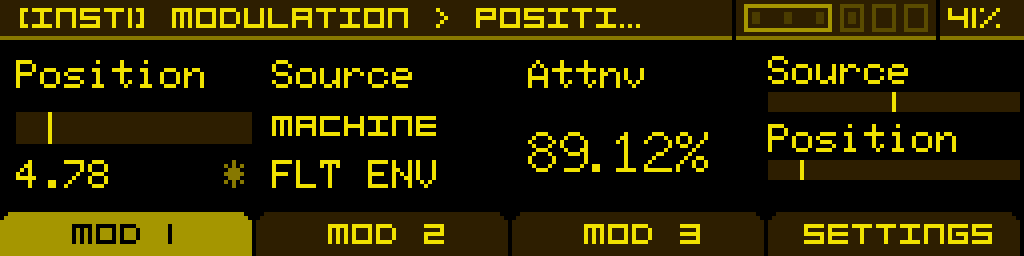
You can assign up to three modulations to a single parameter. The screen is organised in four tabs in the footer:
- MOD 1, MOD 2, MOD 3 — each one assigns one source + an attenuverter to the parameter. The three modulations are summed before being applied.
- SETTINGS — advanced per-parameter options (smoothing, stepped quantization, MIDI CC).
How a modulation is described
A modulation is the pair Source × Attnv:
- Source — what is modulating (selected from the list below).
- Attnv — how much, with sign, from -200% to +200%. Negative values invert the modulation.
The OLED shows each modulation source on two lines: a small header (category) on top, and the specific source label below it. The list and labels are exactly what you'll read on screen.
Modulation sources
Different sources are exposed depending on whether the parameter you're modulating belongs to an instrument (e.g. an oscillator's frequency, a filter cutoff) or to the project itself (e.g. a Macro target, an FX bus parameter).
For an instrument-level parameter
| OLED header | OLED source | Description |
| — | OFF | Slot empty, no modulation. |
| MACHINE | FLT ENV | Built-in filter envelope of the machine. Only on Synthesizer, Sample Player and Granular. |
| MACHINE | AMP ENV | Built-in amp envelope of the machine. Only on Synthesizer, Sample Player and Granular. |
| INSTR M1 … INSTR M6 | modulator label (e.g. DAHDSR, LFOWT, SHAPE, S&H, MSEG, or EMPTY) | One of the 6 modulator slots of the current instrument. |
| V1 M1 … V6 M6 | modulator label | Cross-instrument modulation: any modulator (M1–M6) of any instrument (V1–V6) of the project. 36 sources possible — useful to drive multiple instruments from a single source. |
| NOTE | VELOCITY | Velocity of the note that triggered the voice. |
| NOTE | KEYFOLLOW | Pitch of the played note (key tracking). |
| MIDI | AT | MIDI Aftertouch. Only available with the expander. |
| MIDI | MOD WHL | MIDI Mod Wheel. Only available with the expander. |
| EXTERNAL | CV A … CV F | CV inputs of the main module. |
| EXTERNAL | CV G … CV L | CV inputs of the expander. Only available with the expander. |
| GLOBAL | NOISE | Internal white-noise generator. |
| GLOBAL | MACRO 1 … MACRO 16 | One of the 16 macros of the project. |
For a project-level parameter
When you long-press on a project-level parameter (FX bus parameters, macro targets, etc.) the list shrinks to the sources that aren't bound to a specific voice:
- OFF
- EXTERNAL → CV A–CV F, CV G–CV L (expander)
- GLOBAL → MACRO 1–MACRO 16
- V1 M1 … V6 M6 (cross-instrument modulators)
The categories MACHINE, INSTR M*, NOTE and MIDI are not available, since they are tied to a specific voice.
Tip: when you want a single modulator to drive several instruments at once, route it via a MACRO. Macros are project-level so they can be modulated from any instrument and assigned to any parameter, including parameters of other instruments.
SETTINGS tab
The SETTINGS tab exposes three per-parameter options that don't behave like a modulation source. They are saved with the parameter and are not themselves modulatable.
| Smooth | Stepped | MIDI CC | |
| Smoothing time applied to the parameter when its value moves quickly — reduces zipper noise and clicks. Expressed in milliseconds. At 0 ms there is no smoothing; raise it for slow morphs or to tame fast modulators on continuous parameters. | On / Off toggle. When On, the parameter quantizes its value to discrete steps; when Off, the parameter is fully continuous. Useful on parameters where stepped values matter — typically FM operator Ratio, where stepped quantization keeps the harmonic relationships musical. Default is parameter-dependent: most parameters default to Off, FM Ratios default to On. | MIDI Control Change number assigned to this parameter. Range: Off (no CC), or CC 1 to CC 119. Multiple parameters can share the same CC — moving that CC will then drive every parameter that listens to it. Requires the expander to receive MIDI. |
Shortcuts from the MOD ASSIGN screen
The MOD ASSIGN screen offers shortcuts to the internal modulators it points to, so you don't have to navigate back to the instrument page to edit them.
Open the modulator's edit screen
While on a MOD 1–MOD 3 tab, if the selected source is an internal modulator (an INSTR M* or V* M* source pointing to a non-empty slot), press the encoder to jump directly into that modulator's edit screen. Use Exit to come back.
Add a modulator to an empty slot
If the source you've picked points to an empty slot (label EMPTY), press the encoder to open the modulator-type picker and load a new modulator into the slot — without leaving the MOD ASSIGN screen.
Replace the modulator in an occupied slot
If the source points to an occupied slot, long-press the encoder to swap the modulator for another type. The slot's modulations on this parameter are preserved; the modulator itself changes.