
Synthesis Machines
Sample Player
General information
The Sample Player plays back WAV files loaded from the SD card. It works in two distinct modes:
- Slot mode — up to 8 independent samples, each with its own start, length, loop and playback parameters. Use it to assemble drum kits, vocal chops, or any patch where you want different samples on different keys/voices.
- Slice mode — a single sample is shared across 32 slice points, each with independent playback parameters. Use it to chop a long sample (a drum break, a vocal phrase) into playable sections.
The output goes through a unified FX stage (vintage-flavoured re-samplers, tape, lo-fi…), then the Filter section, then a Drive section, and finally an Amp section before reaching the Mixer.
flowchart LR
    SMP["SAMPLE
(8 slots / 32 slices)"]
    SFX["SAMPLE FX
(SP1200, Tape, LoFi…)"]
    FILT["2 MULTIMODE FILTERS
WITH DIFFERENT ROUTINGS"]
    DRV["DRIVE"]
    DCA1["DCA 1"]
    DCA2["DCA 2"]
    OUT["TO MIXER"]
    FLTENV["FLT ENV"]
    AMPENV["AMP ENV"]

    SMP --> SFX
    SFX --> FILT
    FILT --> DRV
    DRV --> DCA1
    DCA1 --> DCA2
    DCA2 --> OUT
    FLTENV -.->|"cutoff"| FILT
    AMPENV -.->|"VCA"| DCA2

    classDef src fill:#06b6d4,stroke:#22d3ee,color:#fff,stroke-width:2px
    classDef fx fill:#f97316,stroke:#fb923c,color:#fff,stroke-width:2px
    classDef filter fill:#65a30d,stroke:#a3e635,color:#fff,stroke-width:2px
    classDef drive fill:#eab308,stroke:#facc15,color:#000,stroke-width:2px
    classDef dca fill:#ec4899,stroke:#f472b6,color:#fff,stroke-width:2px
    classDef mixer fill:#9333ea,stroke:#c084fc,color:#fff,stroke-width:2px
    classDef env fill:#831843,stroke:#f472b6,color:#fff,stroke-width:2px

    class SMP src
    class SFX fx
    class FILT filter
    class DRV drive
    class DCA1,DCA2 dca
    class OUT mixer
    class FLTENV,AMPENV env
The Machine has dual filter slots, a Drive stage, and built-in ADSR AMP and ADSR FLT envelopes (exposed as modulation sources, like the Synthesizer).
It plays mono, 16-bit, 48 kHz internally — files of other formats are converted on the fly. Stereo files use the left channel only.
Loading a sample
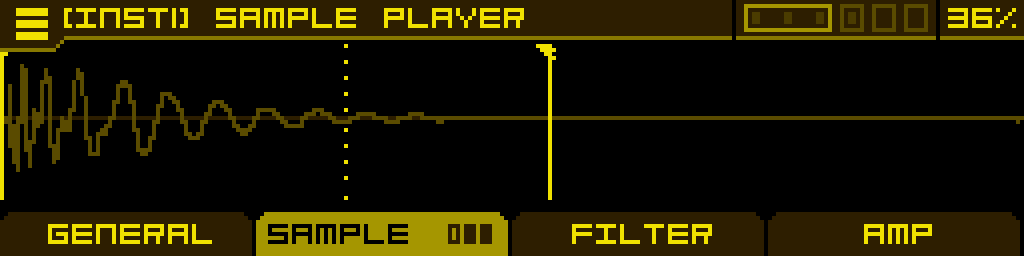
Long-press the GENERAL tab to open the burger menu and pick Load sample — this opens a file browser into the sample folders on the SD card. In the browser, press Button 4 to enable auto-loading for a quick preview of each file. Once a sample is loaded, turning the encoder scrolls through other samples in the same folder; a wave preview pops up briefly each time.
In Slot mode, the loaded sample replaces the sample of the currently selected slot. In Slice mode, the loaded sample is shared across all 32 slices.
GENERAL tab
Two pages.
Page 1
| SampleMode | Frequency | Transpose | Volume |
| Switches between Slot and Slice mode. Changing this swaps which set of playback parameters the SAMPLE tab edits. | Fine-tune the playback pitch. | Tune the playback in semitone increments. | Output level into the FX/Filter chain. 100% is unity gain; up to 200% to overdrive the downstream stages. |
Page 2
| KeyboardMode | |||
| How a MIDI keyboard plays the slots/slices. Two options: Pitch (the keyboard plays the active slot/slice across notes) or Select (each key picks a different slot/slice). |
SAMPLE tab
Three pages of playback parameters, all per-slot (in Slot mode) or per-slice (in Slice mode). Switching slots/slices via SlotSelect instantly reloads the page contents to show that slot's settings.
Page 1
| SlotSelect | Start | Loop | Length |
| Selects the active slot (1–8 in Slot mode) or slice (1–32 in Slice mode). Modulate it to step between slots/slices via any modulation source. | Sample start point for the active slot/slice. | Loop point inside the slot/slice (used when PlayMode is one of the loop modes). | End point — sets where playback stops. |
Page 2
| PlayMode | |||
| Selects how the slot/slice plays: Forward, Forward Loop, Reverse, Reverse Loop. This parameter is per-slot/per-slice and cannot be modulated. |
Page 3 — FX
| SampleFXType | SampleFXDepth | ||
| Selects the sample-specific FX flavour. 9 vintage-style algorithms (see below). Set to Off to bypass. | Single intensity knob for the active FX type. Disabled while SampleFXType is Off. |
Sample FX reference
| FX | Character |
| SP1200 | The crunchy 12-bit, 26-kHz vibe of the SP-1200 sampler — bit-rate reduction with characteristic aliasing. |
| MPC60 | MPC60-style sampling colour: 12-bit, 40 kHz with companding. |
| Amiga | Amiga 8-bit DAC and audio path. |
| Vinyl | Vinyl-style noise, surface crackle and tone shaping. |
| Tape | Tape saturation and frequency-response curve. |
| LoFi | Combined lo-fi degradation — bit and rate reduction with filtering. |
| Wavefold | Wavefolding distortion that adds harmonics as FXDepth rises. |
| Bitcrush | Pure bit-depth reduction. |
| VHS | VHS-style wow, flutter and noise. |
FILTER tab
Three pages: Filter 1, Filter 2, then a routing/balance page. Same dual-filter family as the Synthesizer — see the Filter Section page for the full filter type reference and routing options.
AMP tab
| DCADriveType | DCADrive | DCA1 | DCA2 |
| Post-filter drive curve. Set to Off to bypass. | Drive amount. Disabled while DCADriveType is Off. | First amplitude stage with VU meter. | Second amplitude stage. By default modulated by ADSR AMP, so this is the knob the envelope opens on note-on. |
FLT ENV / AMP ENV tabs
The Sample Player has two built-in ADSR envelopes — one feeding the Filter stage (FLT ENV) and one feeding the Amp stage (AMP ENV). They are accessed as alternate tabs:
- Press ALT + FILTER tab to open the FLT ENV tab.
- Press ALT + AMP tab to open the AMP ENV tab.
Each envelope has the standard A / D / S / R parameters plus per-stage curve shaping (CurveA, CurveD, CurveR). Both envelopes are exposed as modulation sources (ADSR AMP, ADSR FLT) and can be assigned to any modulatable parameter.
By default these envelopes are pre-wired as regular modulations in the MOD 1 slot of two parameters:
- ADSR AMP is assigned to DCA2 → MOD 1, so notes have an envelope.
- ADSR FLT is assigned to Filter 1 cutoff → MOD 1, so the filter opens with the envelope.
These default assignments behave exactly like any modulation you would create yourself: long-press the button below DCA2 or Filter 1 cutoff to open MOD ASSIGN, where you can adjust the Attnv of MOD 1, remove the envelope (set MOD 1 to Off), or replace it with another source. The envelope itself remains available in the MACHINE category of MOD ASSIGN, so you can re-assign ADSR AMP or ADSR FLT to any other parameter (or back) at any time.
Tip: modulate SlotSelect with a Shape sequencer to step through slots/slices over time — perfect for sliced break loops or evolving drum patterns.