
The instruments
Voice control (Instrument control)
Functionality
The CONTROL slot of an instrument (also called Instrument control) is where you configure how the instrument receives notes from the outside world — control source (CV/Gate or MIDI), MIDI channel and pitch bend range, and the routing of CV / Gate inputs to each voice of the instrument.
**What this slot does not cover. Voice mode (Mono, Legato, Unison, Unison Legato, Poly), per-voice Spread, Drift, Glide, scale quantization and transposition no longer live in the CONTROL slot. They are now properties of the Note FX loaded in the instrument — by default, the Note Note FX, which provides all the per-instrument note-shaping that this section used to handle. See the Note FX** chapter for the details.
Each instrument can have between 1 and 6 voices. The number of voices is set in the project's voice layout. Because the CONTROL settings describe how the module's physical inputs feed each voice, they are stored at the project level, not in the instrument preset. If you want the same I/O setup in every project, you can pin it system-wide — see Locking the control config across projects below.
Accessing the voice controller
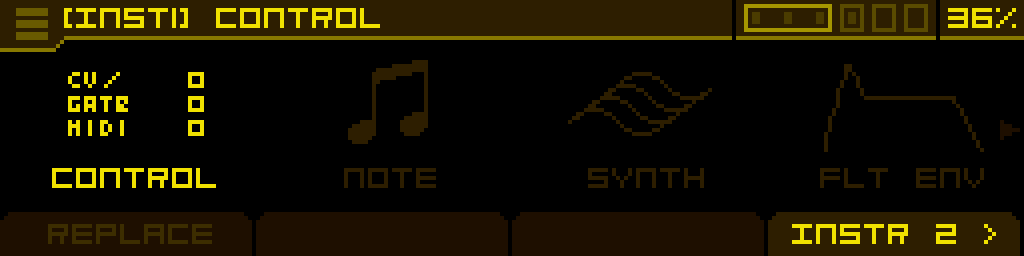
From the PROJECT main screen, select an instrument and click the encoder to enter the INSTRUMENT screen. The first slot — CONTROL — opens the INSTR. CONTROL screen described below.
Screen layout
The INSTR. CONTROL screen is organised in four tabs, accessible from the footer:
CONTROL — MIDI — CV — GATE
The header reads [INSTn] EDIT INSTR. CONTROL. Turning the encoder switches between instruments without leaving the screen, so you can configure several instruments in a row.
CONTROL tab
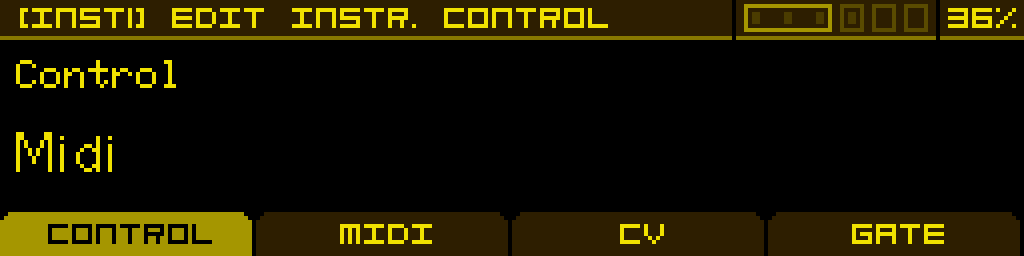
A single parameter — Control — selects the source used to drive the instrument:
| Control | Defines how the instrument is controlled: - Off — disabled - CV/Gate — controlled via Antigone's CV/Gate inputs (and those of the expander, if connected) - MIDI — controlled via the MIDI input of the expander |
Once the control source is set, switch to the MIDI or CV / GATE tab to configure the routing for that source.
MIDI tab
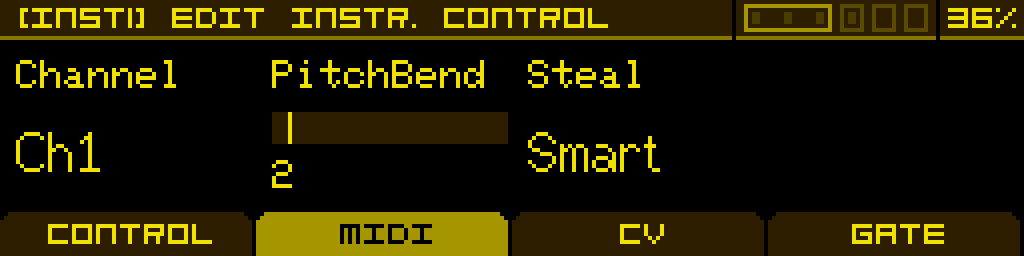
The MIDI tab is used when Control is set to MIDI:
| Channel | The MIDI channel used to control this instrument. A single MIDI channel can be assigned to several instruments simultaneously (multi-timbral configurations). |
| PitchBend | Maximum pitch bend range, in semitones. |
| Steal | Voice-stealing strategy used when a new note comes in and no voice is free. Six modes are available — see below. |
Steal modes
| Smart (default) | Prefers a free voice already tuned to the incoming note. Otherwise picks the quietest silent voice closest in pitch to the new note, then the free voice nearest in pitch, and finally falls back to stealing the oldest active voice. Best balance of responsiveness and musical coherence. |
| Round | Simple round-robin: each new note steps to the next voice in order, regardless of pitch or whether the voice is active. |
| Quiet | Steals the voice with the lowest current output volume — free voices win over active voices when their levels are equal. |
| Oldest | Allocates to the oldest released free voice first. If every voice is active, steals the one that was triggered the longest ago. |
| Nearest | Picks the voice whose previous note is closest in pitch to the incoming note. Prefers free voices; only steals an active voice when necessary. |
| Random | Picks at random among free voices. If every voice is busy, steals one at random. |
CV tab
The CV tab is used when Control is set to CV/Gate. It assigns one of Antigone's V/Oct inputs to each voice of the instrument.
Reminder: Antigone's CV inputs are calibrated for the standard 1V/octave.
The example below shows a polyphonic instrument with 3 voices, controlled by CV inputs A, B and C. CV inputs A–F belong to the main module; G–L belong to the expander.
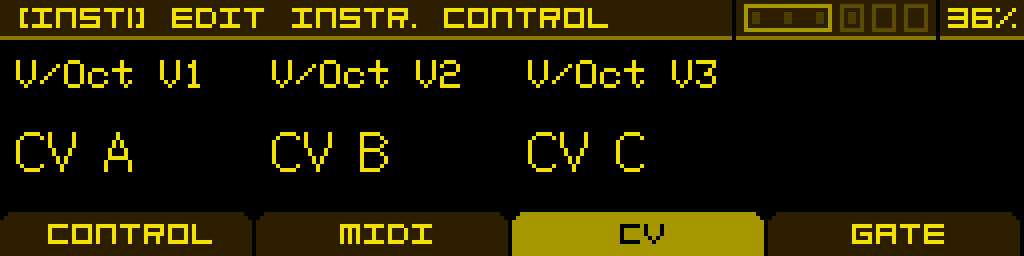
The tab spans 1 page for instruments with up to 4 voices, and 2 pages for 5–6 voices.
GATE tab
The GATE tab is used when Control is set to CV/Gate. It assigns one of Antigone's Gate inputs to each voice — Gate inputs 1–4 belong to the main module, 5 and 6 belong to the expander.
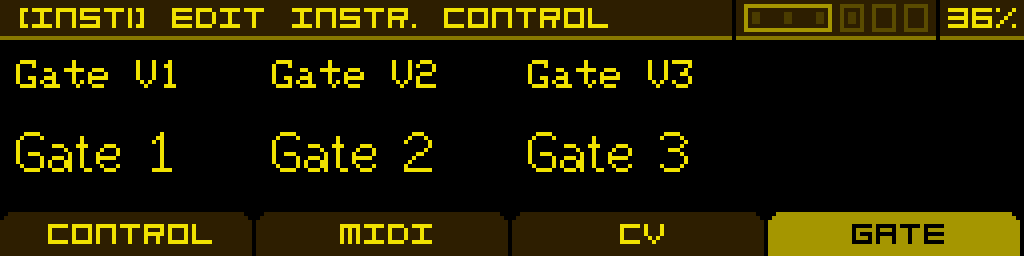
As for the CV tab, the GATE tab spans 1 page for up to 4 voices, and 2 pages for 5–6 voices.
Locking the control config across projects
Because the CONTROL settings are normally stored per project, loading a different project replaces them. The burger menu of the INSTR. CONTROL screen (long-press) adds a Lock config toggle that lets you pin them instead.
When Lock config is enabled, the instrument-control configuration is stored system-wide on the SD card (/System/config.json), independent of any project, and it:
- survives every project load — your Control / MIDI / CV / Gate routing no longer changes when you open another project;
- is recalled automatically at startup.
What is locked per instrument: the Control mode, MIDI Channel, PitchBend and Steal. What is locked per physical voice: the CV (V/Oct) and Gate routing — this lock follows the hardware connector, so your patch bay stays consistent regardless of how a given project allocates voices to instruments.
Changes made while locked are saved automatically. Toggle Lock config off to let projects own the control configuration again.
Going further
For voice mode (Mono, Legato, Unison, Unison Legato, Poly), Spread, Drift, Glide, scale quantization and transposition, see the dedicated Note Note FX page.