
The projects
Files & templates
A project is stored on the SD card as a single, self-contained file with the .nagp extension (Nanopolis Antigone Global Project). It holds everything that defines the project state — voice layout, every instrument, every modulator, every modulation, every macro, mixer settings, FX bus, clock — so loading it back restores the module to the exact state it was in when you saved.
Antigone also ships with a small library of project templates that you can use as starting points when you open New project from the burger menu.
What's inside a .nagp
| Section | Stored |
| Voice layout | How the 6 voices are distributed between instruments. (No longer a separate file — it is a property of the project.) |
| Instruments (1–6) | For each instrument: its CONTROL configuration (CV/Gate or MIDI source, channel, V/Oct routing, Gate routing), its Note FX, its machine and every machine parameter, its 6 modulators and their settings, and every modulation (source + attenuverter) on every parameter. |
| Mixer | Volume, Pan, Spread, Output, mute/solo and FX send for every instrument, plus the global FX bus configuration (effect, mode, wet, output, effect-specific parameters). |
| Macros | The 16 macros, with their names, their CC assignments, and their per-parameter modulation depth. |
| Clock | Internal/external mode, BPM, swing, sync settings. |
A project file is therefore complete and autonomous: copying a .nagp to another module's SD card reproduces the same patch.
Where projects live on the SD card
/Projects/
    My patch 1.nagp
    Live set – ambient.nagp
    …
The browser opens at /Projects/ by default but you are free to organise sub-folders inside it (e.g. /Projects/Live/, /Projects/Demo/).
Project templates
A template is a regular .nagp placed under /System/Template/Project/. Antigone scans this folder at boot and exposes its contents in the New project sub-menu of the PROJECT burger.
/System/Template/Project/
    Init.nagp
    Polysynth 6 voices.nagp
    Drum kit.nagp
    Stereo pad.nagp
    …
When you pick a template from New project:
- The module loads the chosen template into memory as the current project.
- The default name is
New project(unsaved). The first Save project as… writes a new.nagpunder/Projects/.
To create your own template, save a project to /System/Template/Project/ with a meaningful name. It will appear in New project on the next boot.
Tip: templates are perfect for committing your favourite starting points — a 4-instrument drum kit, a stereo polysynth, a paraphonic CV bench. Build the patch once, save it under /System/Template/Project/, and you can recreate it from a fresh project in two clicks.
Saving and loading from the burger menu
From the PROJECT screen, scroll the encoder fully to the left and press it to open the burger menu. The relevant entries are:
- Project browser — opens the file browser at
/Projects/to load any.nagp. - Save project — overwrites the currently open
.nagpin place. - Save project as… — saves the project under a new name (a name editor is shown).
- New project — opens the templates submenu.
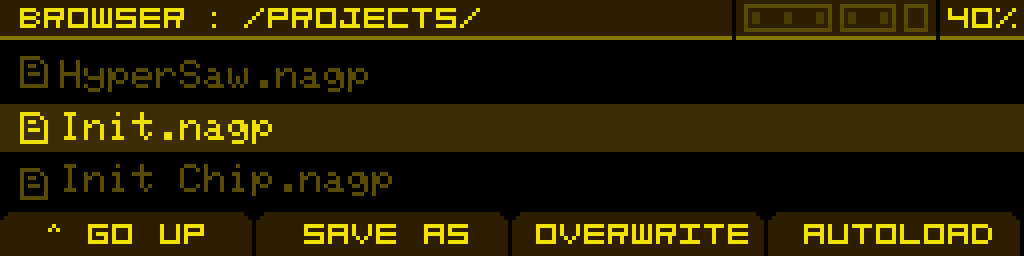
The current project's filename is shown in the header of the PROJECT screen at all times.
Auto-save behaviour
Antigone does not auto-save. Make a habit of pressing Save project before powering off — anything edited but not saved since the last .nagp write will be lost on power-down.
For a per-instrument file format (which travels independently of the project), see Instrument file templates.