
General features
Mixer
Functionality
The Antigone mixer is the project-level mixing desk. It controls how the audio signal of each instrument is shaped (volume, pan, stereo spread, FX send) and routed to the module's audio outputs, and it hosts a global FX BUS with multiple time-based and modulation effects.
Since Antigone supports up to 6 instruments, the mixer manages up to 6 corresponding audio tracks. Each instrument's audio output is mono and can be routed either to a mono output or to a stereo pair. When an instrument is routed to a stereo pair, Pan and Spread become available.
flowchart LR
    INSTR["Instrument N"]
    VOL["Volume
(Mute · Solo)"]
    SEND["Send FX"]
    PAN["Pan / Spread"]
    OUT["Output
(OUT 1-4 mono · OUT 1-2 / 3-4 stereo)"]

    FXBUS["FX BUS
(one of: Space · Room · Plate · Shimmer ·
Delay · Tape · VHS · Reverse · Chorus · Phaser · Flanger)"]
    FXOUT["FX bus Output
(its own OUT routing)"]

    AUDIO["Audio outputs
OUT 1 · 2 · 3 · 4"]

    INSTR --> VOL
    VOL --> PAN
    PAN --> OUT
    OUT --> AUDIO

    VOL --> SEND
    SEND --> FXBUS
    FXBUS --> FXOUT
    FXOUT --> AUDIO

    classDef instr fill:#06b6d4,stroke:#22d3ee,color:#fff,stroke-width:2px
    classDef stage fill:#65a30d,stroke:#a3e635,color:#fff,stroke-width:2px
    classDef send fill:#eab308,stroke:#facc15,color:#000,stroke-width:2px
    classDef fxbus fill:#f97316,stroke:#fb923c,color:#fff,stroke-width:2px
    classDef out fill:#9333ea,stroke:#c084fc,color:#fff,stroke-width:2px
    classDef audio fill:#1e3a8a,stroke:#60a5fa,color:#fff,stroke-width:2px

    class INSTR instr
    class VOL,PAN stage
    class SEND send
    class FXBUS,FXOUT fxbus
    class OUT out
    class AUDIO audio
The same path is repeated for each of the project's instruments (1 to 6). Their per-instrument outputs are summed at the destination output, and the FX bus mixes every instrument's send signal into a single global effect before routing it to its own audio output.
Main mixer screen
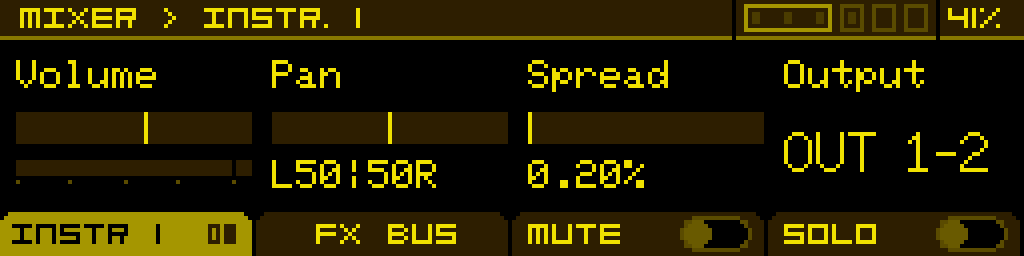
How to access the mixer
The mixer is a project-level component reached through the shortcut menu — open it from anywhere with ALT + encoder, or from the PROJECT screen via the MENU > footer button, then pick MIXER.
Footer buttons
The mixer screen is organised around two tabs and two toggle buttons:
| INSTR. | FX BUS | MUTE | SOLO |
| Switches to the per-instrument tab. When already on this tab, pressing the button cycles between its pages (main / SEND). | Switches to the global FX bus tab. When already on this tab, pressing the button cycles between its pages (common / effect-specific). | Toggles mute on the currently selected instrument. Active only on the INSTR. tab. | Toggles solo on the currently selected instrument. Active only on the INSTR. tab. |
INSTR. tab
This tab manages the per-instrument settings. Turn the encoder to switch between instruments — the header reads MIXER > INSTR. n, and the highlighted instrument is the one being edited.
Page 1 — main parameters
| Volume | Pan | Spread | Output |
| The instrument's volume, 0 → 100 %. Comes with a built-in VU meter and clip indicator. | Position of the instrument in the stereo field (left ↔ right). Active only when Output is set to a stereo pair. | Distribution of the instrument's voices across the stereo field. Active only when Output is set to a stereo pair. | Selects the audio output. Off disables the instrument's output. OUT 1 to OUT 4 route the instrument to a mono output. OUT 1-2 and OUT 3-4 route it to a stereo pair (unlocks Pan and Spread). |
Page 2 — SEND
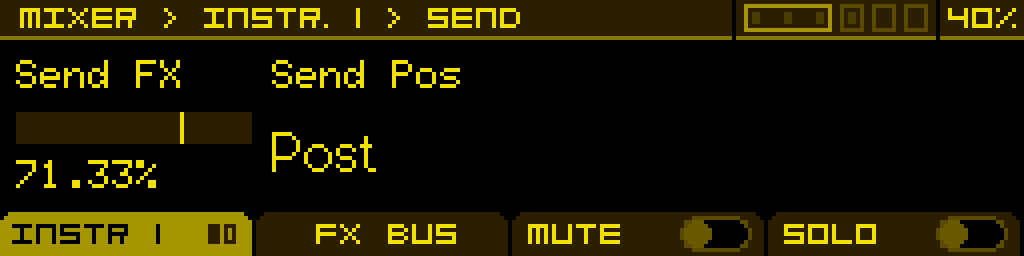
| Send FX | Send Pos | ||
| Amount of the instrument's signal sent to the global FX BUS. Set this to 0 to keep the instrument fully dry. | Where the send is tapped from in the signal chain. Post (default) — taken after the instrument's Volume, so lowering Volume on page 1 also lowers the FX send. Pre — taken before Volume, so the FX send stays at the level set here regardless of the main Volume (useful to keep effects audible while muting the dry signal, or to drive the bus with a fixed amount independent of mix balance). |
FX BUS tab
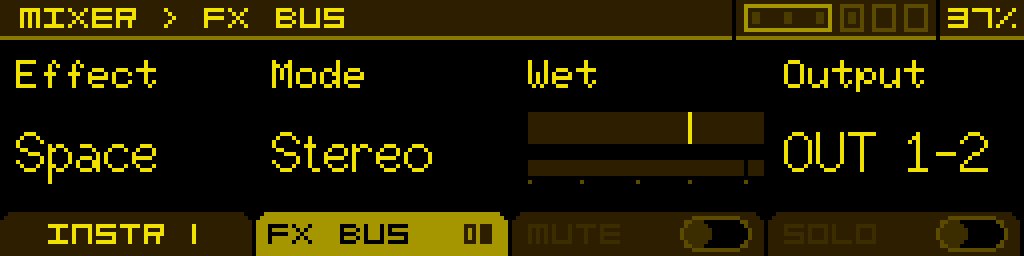
The FX BUS is a global, project-level effect bus shared by every instrument. Each instrument feeds it via its Send FX parameter; the bus runs a single effect at a time, mixes its wet output back, and routes the result to its own audio output.
Page 1 — common parameters
| Effect | Mode | Wet | Output |
| Selects the active effect on the bus. Available effects: Off, Space (reverb), Room (reverb), Plate (reverb), Shimmer (octave-up feedback reverb), Delay, Tape, VHS (lo-fi tape degradation), Reverse (reverse delay), Chorus, Phaser, Flanger. Off bypasses the bus entirely. This parameter cannot be modulated. | Mono or Stereo processing on the bus. | Wet level of the bus output, with a built-in VU meter and clip indicator. | Output the FX bus is routed to. Same options as the per-instrument Output parameter (Off, OUT 1–4, OUT 1-2, OUT 3-4). |
Mode, Wet and Output become inactive when Effect is set to Off — the bus is fully bypassed.
Page 2 — effect-specific parameters
The second page only exists when an effect is active. Its four knobs change with the selected effect:
| Effect | Knob 1 | Knob 2 | Knob 3 | Knob 4 |
| Space | Decay | Damping | Mod Rate | Diffusion |
| Room | Decay | Damping | PreDelay | — |
| Plate | Decay | Damping | PreDelay | — |
| Shimmer | Decay | Damping | Shimmer | Tone |
| Delay | Time | Feedback | PingPong | Sync |
| Tape | Time | Feedback | Tone | Saturation (+ Sync on page 3) |
| VHS | Wow | Flutter | Wear | Hiss |
| Reverse | Time | Feedback | Tone | Sync |
| Chorus | Rate | Depth | — | — |
| Phaser | Rate | Depth | Feedback | — |
| Flanger | Rate | Depth | Feedback | — |
Shimmer
An octave-up feedback reverb built on a feedback delay network. A pitch shifter detects the reverb tail's content and feeds an octave-up version back into the tank for that ethereal, soaring shimmer signature. Includes safety limiters to keep the feedback in check.
- Decay — feedback level of the reverb tank. Affects both the base reverb and the shimmer tail.
- Damping — low-pass filtering inside the tank. Higher values dull the tail.
- Shimmer — amount of octave-up signal fed back into the reverb. At 0 the effect behaves like a regular reverb; at 100% the octave layer dominates.
- Tone — overall brightness of the shimmer (filtering and modulation depth on the pitched signal).
VHS
A lo-fi tape-degradation effect modelling VHS video-tape artefacts: speed wobble, mechanical flutter, bandwidth roll-off and hiss.
- Wow — slow tape-speed drift modulation.
- Flutter — fast mechanical wobble of the transport.
- Wear — bandwidth reduction and saturation, modelling worn-out tape.
- Hiss — adds a tape-noise floor.
Reverse
A reverse delay: it plays the previous time window backwards. Two overlapping reversed grains with a triangular crossfade keep grain boundaries click-free, and feedback re-reverses each pass (reverse → forward → reverse…) for the classic reverse-echo trail.
- Time — length of the reversed window (also the grain length). Clock-syncable via Sync.
- Feedback — amount fed back into the effect; each pass is re-reversed.
- Tone — tone tilt of the feedback loop (dark ↔ thin).
- Sync — see Clock sync below.
Clock sync (Delay · Tape · Reverse)
The Delay, Tape and Reverse effects share a Sync parameter that locks their time to the project clock. Set it to FREE to use the Time knob in milliseconds, or pick a clock division (up to a full 1BAR) to lock the time to tempo — the Time knob is then ignored. On Delay and Reverse, Sync is the fourth knob of the effect page; on Tape it sits on a third page of the FX BUS tab.
Tip: the FX bus runs one effect at a time — switching the Effect parameter swaps it instantly, but the previous effect's tail is cleared as the new one takes over. To keep two effects sounding simultaneously, use one of the per-instrument Drive or the modulation system on a parameter, and reserve the FX bus for the time-based effect you actually want global.