
Synthesis Machines
Granular Machine
General information
The Granular Machine takes a single sample loaded from the SD card and re-synthesises it as a stream of small overlapping fragments — grains. Each grain has its own position, duration, pitch and direction, so the same source sample can be turned into anything from a single time-stretched playback to a thick, evolving cloud of texture.
The Machine output goes into a Filter section, then a Drive section, and finally an Amp section before reaching the Mixer.
flowchart LR
    GRN["GRANULAR CLOUD
(grain stream)"]
    FILT["2 MULTIMODE FILTERS
WITH DIFFERENT ROUTINGS"]
    DRV["DRIVE"]
    DCA1["DCA 1"]
    DCA2["DCA 2"]
    OUT["TO MIXER"]
    FLTENV["FLT ENV"]
    AMPENV["AMP ENV"]

    GRN --> FILT
    FILT --> DRV
    DRV --> DCA1
    DCA1 --> DCA2
    DCA2 --> OUT
    FLTENV -.->|"cutoff"| FILT
    AMPENV -.->|"VCA"| DCA2

    classDef src fill:#06b6d4,stroke:#22d3ee,color:#fff,stroke-width:2px
    classDef filter fill:#65a30d,stroke:#a3e635,color:#fff,stroke-width:2px
    classDef drive fill:#eab308,stroke:#facc15,color:#000,stroke-width:2px
    classDef dca fill:#ec4899,stroke:#f472b6,color:#fff,stroke-width:2px
    classDef mixer fill:#9333ea,stroke:#c084fc,color:#fff,stroke-width:2px
    classDef env fill:#831843,stroke:#f472b6,color:#fff,stroke-width:2px

    class GRN src
    class FILT filter
    class DRV drive
    class DCA1,DCA2 dca
    class OUT mixer
    class FLTENV,AMPENV env
The Granular Machine has dual filter slots, a Drive stage, and built-in ADSR AMP and ADSR FLT envelopes (exposed as modulation sources, just like on the Synthesizer).
Loading a sample
Open the burger menu (long-press) on the GENERAL tab and pick Load sample to browse the SD card. A single sample is loaded for the whole Machine — there is no multi-slot or slice mode here.
GENERAL tab
| Frequency | Transpose | Volume | |
| Fine-tune the playback pitch. | Tune the playback in semitone increments. | Output level into the Filter section. 100% is unity gain; up to 200% to overdrive the downstream chain. |
GRAIN tab
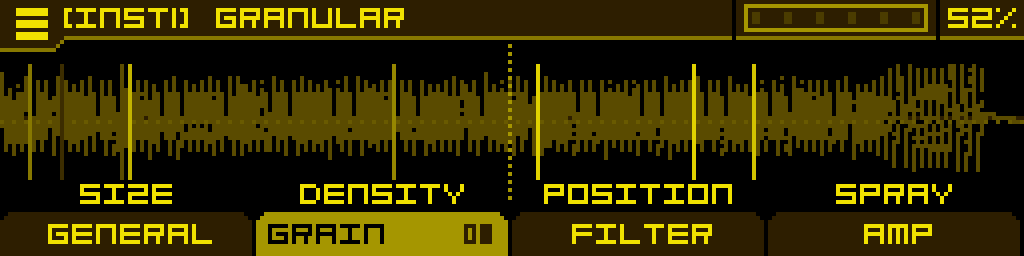
Two pages of grain controls. Page 1 covers spawn timing, position and randomisation; Page 2 covers per-grain pitch, direction, window shape and density limit.
Page 1
| Size | Density | Position | Spray |
| Duration of each grain (10 to 500 ms). Short grains give buzzy, granular textures; long grains give smooth, audible loops. | How often a new grain is spawned, in Hz. High density layers many grains for thick clouds; low density spaces them out. | Base read position in the sample (0 = start, 1 = end). Modulate to sweep through the sample. | Random offset added to Position for each new grain. At 0 every grain reads the same place; raise it to scatter grains around the base position. |
Page 2
| Pitch Rnd | Reverse | Window | Max Grains |
| Random pitch variation applied to each new grain. At 0 every grain plays at the note's pitch; raise it for de-tuned, blurred clouds. | Probability that a grain plays in reverse. At 0 all grains play forward; at 1 all grains play backward; in between, each grain randomly picks a direction. | Envelope shape applied to each grain to fade it in and out. Three options: Hanning, Gaussian, Triangle. | Hard cap on the number of grains overlapping at any time per voice (1 to 16). Lower values save CPU and tighten the texture; higher values allow denser clouds. |
FILTER tab
Three pages: Filter 1, Filter 2, then a routing/balance page. Identical to the Synthesizer — see the Filter Section page for the full filter type reference and routing options.
AMP tab
| DCADriveType | DCADrive | DCA1 | DCA2 |
| Selects the post-filter drive curve. Set to Off to bypass the drive stage. Same drive list as the Synthesizer. | Drive amount. Disabled while DCADriveType is Off. | First amplitude stage with VU meter. | Second amplitude stage. By default it is modulated by the ADSR AMP envelope, so this is the knob that gates the sound on note-on/note-off. |
FLT ENV / AMP ENV tabs
The Granular Machine has two built-in ADSR envelopes — one feeding the Filter stage (FLT ENV) and one feeding the Amp stage (AMP ENV). They are accessed as alternate tabs:
- Press ALT + FILTER tab to open the FLT ENV tab.
- Press ALT + AMP tab to open the AMP ENV tab.
Each envelope has the standard A / D / S / R parameters plus per-stage curve shaping (CurveA, CurveD, CurveR). Both envelopes are exposed as modulation sources (ADSR AMP, ADSR FLT) and can be assigned to any modulatable parameter.
By default these envelopes are pre-wired as regular modulations in the MOD 1 slot of two parameters:
- ADSR AMP is assigned to DCA2 → MOD 1, so notes have an envelope.
- ADSR FLT is assigned to Filter 1 cutoff → MOD 1, so the filter opens with the envelope.
These default assignments behave exactly like any modulation you would create yourself: long-press the button below DCA2 or Filter 1 cutoff to open MOD ASSIGN, where you can adjust the Attnv of MOD 1, remove the envelope (set MOD 1 to Off), or replace it with another source. The envelope itself remains available in the MACHINE category of MOD ASSIGN, so you can re-assign ADSR AMP or ADSR FLT to any other parameter (or back) at any time.
Tip: route ADSR AMP to Position (the grain Position knob) for envelope-driven scrubbing through the sample, or to Density for clouds that thin out as the note decays.