
Modulators
Multi-Segment Envelope
The MSEG (Multi-Segment Envelope) is a configurable envelope modulator that lets you draw an arbitrary contour out of 2 to 8 segments, each with its own Rate (time) and Level. Unlike the ADSR, where the shape is fixed by the Attack-Decay-Sustain-Release model, the MSEG lets you place the sustain point freely, define a release segment freely, and optionally loop a portion of the envelope.
The main features of this MSEG are:
- 2 to 8 user-definable segments
- Per-segment Rate (time) and Level (target value)
- Configurable Sus.Seg (the segment the envelope holds at while the gate is high)
- Configurable Rel.Seg (the segment the envelope jumps to when the gate falls)
- Looping with a configurable loop start point
- Multiple modes (Gate, Trig, Loop, Gat.Loop)
- Per-voice or shared rendering
- Output gain that can itself be modulated, to function as a "Depth" parameter
The output is unipolar (0 → 100%). Like other modulators, the MSEG can be assigned to any modulatable parameter from that parameter's MOD ASSIGN screen (long-press the button below the parameter).
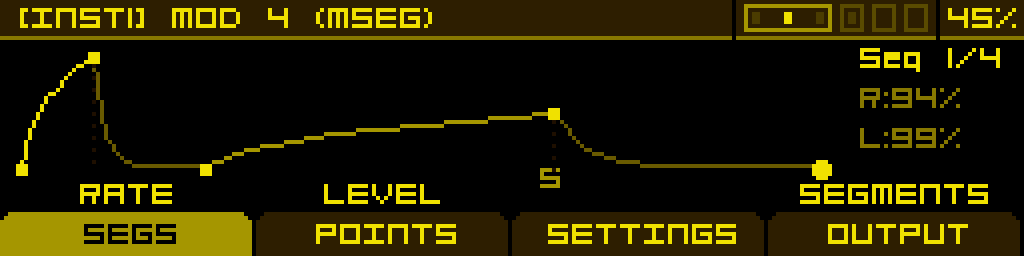
SEGS tab
The SEGS tab is where you draw the envelope. Use the encoder to step between segments — the active segment is highlighted, and Buttons 1 and 2 immediately edit its Rate and Level.
| Rate | Level | Segments | |
| Time of the currently selected segment. Higher values stretch the segment. | Target level the envelope reaches at the end of the currently selected segment. | Total number of segments in the envelope (2 to 8). Reducing this trims segments off the end. |
POINTS tab
The POINTS tab pins down the structural points of the envelope: where the sustain holds, where the release starts, and where a loop should restart from.
| Sus.Seg | Rel.Seg | LoopStart | |
| Index of the segment the envelope holds at while the gate is high. Choices: Off or 1 through 8. When Off there is no sustain — the envelope plays through and stops. | Index of the segment the envelope jumps to when the gate falls. Choices: Off or 1 through 8. When Off the envelope simply continues from where it was when the gate fell. | Segment the envelope returns to when looping (1 to 8). Only used by the Loop and Gat.Loop modes. |
SETTINGS tab
These parameters define the envelope's behaviour and cannot be modulated.
| Mode | Trig | Retrig | |
| How the envelope responds to triggers and gates: Gate: standard. Plays through, holds at Sus.Seg, releases via Rel.Seg. Trig: ignores gate length — plays through to the end on a single trigger. Sus.Seg is skipped. Loop: free-running. Cycles from LoopStart to the last segment continuously. Gat.Loop: loops while the gate is high; stops when the gate falls. | Source that triggers the envelope. Same options as the ADSR — Note (voice note-on), any of the 6 Gate inputs, or one of the tempo-synced CLK divisions (1/64 up to 16BAR). Off disables triggering. | When On, an incoming trigger received before the envelope finishes restarts it from the beginning. When Off, the new trigger is ignored if the envelope is still mid-flight. |
OUTPUT tab
A final gain stage for the envelope, which can itself be modulated.
| Gain | |||
| Adjusts the amplitude of the envelope output (-100% to +100%). At -100% there is no output. Typically used as a Velocity-modulation input — assign a velocity source to Gain to scale the envelope depth per note. |
Tip: the MSEG can be set to render Per Voice (each voice computes its own envelope) or Shared (one envelope shared across all voices). Per-Voice is the default; switch to Shared for global modulation that should evolve identically on every voice.