
Modulators
LFO Wavetable
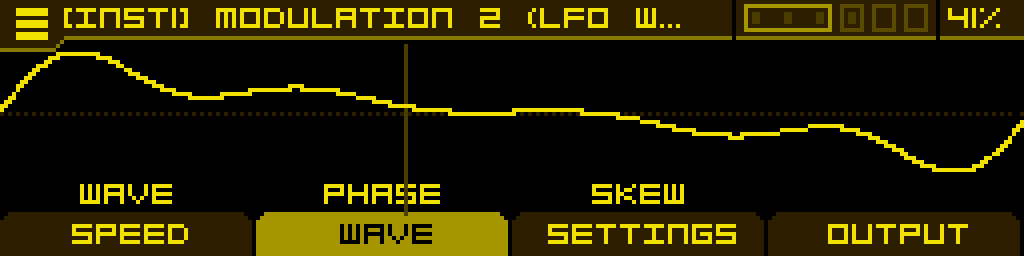
The LFO Wavetable is a Low-Frequency Oscillator that scans through wavetables instead of a fixed waveform. Any of the wavetables on the SD card can be loaded, and the LFO output is taken from a single wave inside that wavetable.
Main features:
- Per-wave LFO output: navigate the loaded wavetable with the Wave knob, modulate it for morphing modulation
- Four speed modes: Free, Clock (tempo-synced), Ratio (synced to the voice's oscillator frequency, allowing audio-rate modulation) and OneShot (single-cycle envelope)
- Configurable phase Skew for asymmetric, PWM-style waveshapes
- Multiple frequency ranges (Slow, Medium, Fast) in Free and OneShot modes
- Trigger from any Gate input, voice trigger or tempo-synced clock division
- Three output polarities: bipolar, unipolar positive, unipolar negative
- Output gain that can itself be modulated, useful for velocity/depth modulation
The LFO can be assigned to any modulatable parameter from that parameter's MOD ASSIGN screen (long-press the button below the parameter).
Loading a wavetable
On any tab, turn the encoder to scroll through wavetables in the current folder. Click the encoder to open the file browser and load a wavetable from another folder.
In the browser:
- Press Button 1 to navigate up a folder level.
- Press Button 4 to enable Autoload, allowing real-time auditioning.
- Click the encoder to open a folder or load a file.
SPEED tab
This is where you set the LFO's running mode and rate. The first three buttons change with the active SpeedMode.
Free / OneShot mode
| Frequency | Range | SpeedMode | |
| LFO frequency. The exact range depends on Range (see below). Mapped exponentially. | Selects the frequency range: Slow: 0.001 Hz to 2 Hz Medium (default): 0.1 Hz to 50 Hz Fast: 1 Hz to 5000 Hz | Selects the LFO mode: Free, Clock, Ratio or OneShot. |
Clock mode
| Clock | SpeedMode | ||
| Selects the tempo-synced clock division. Choices: 16BAR, 8BAR, 4BAR, 2BAR, 1BAR, 1/2, 1/4, 1/8, 1/16, 1/32, 1/64. | Selects the LFO mode. |
Ratio mode
| Ratio | Offset | SpeedMode | |
| Stepped ratio relative to the voice's oscillator frequency, in 0.25× increments from 0.25× up to 24×. Useful for FM/AM-style audio-rate modulation that tracks the played note. | Continuous fine offset added on top of Ratio, ±0.25× of the voice frequency. Use to detune slightly off the integer ratio for richer beating textures. | Selects the LFO mode. |
WAVE tab
| Wave | Phase | Skew | |
| Selects the wave inside the loaded wavetable (1 to N where N = total waves in the wavetable). Modulate for classic wavetable morph modulation. | Phase offset of the LFO (-100% to +100%) — shifts the starting point of the waveform. Negative values wrap the phase backward. | Phase distortion on the time axis (-100% to +100%). At 0 the wave plays normally; positive values compress the first half and stretch the second; negative values do the opposite. Equivalent to PWM-style waveshape skewing. |
SETTINGS tab
These parameters define the LFO's behaviour and cannot be modulated.
| Trig | |||
| Source that resets the LFO phase to 0 (and, in OneShot mode, restarts the envelope). Choices: Off · Gate 1 through Gate 6 · Note (voice note-on) · CLK 1/64, CLK 1/32, CLK 1/16, CLK 1/8, CLK 1/4, CLK 1/2, CLK 1BAR, CLK 2BAR, CLK 4BAR, CLK 8BAR, CLK 16BAR (tempo-synced divisions). |
OUTPUT tab
| Polarity | Gain | ||
| Output polarity: BI — bipolar (default), output swings from negative to positive. UNI + — unipolar positive, output is always ≥ 0. UNI − — unipolar negative, output is always ≤ 0. | Output level (-100% to +100%). Can be modulated — typically used as a velocity-driven Depth control. At -100% the output is silent. |
Tip: in OneShot mode the LFO behaves as an envelope — set a Trig source, then on each trigger the LFO plays through one cycle of the wave and stops. Pair with a wavetable made of envelope-shaped waveforms to get arbitrary envelope contours, or use it as a one-shot LFO for note-aligned shimmer.
Render mode (Per Voice / Shared) — like every modulator, the LFO can be set to Per Voice (one independent LFO per voice of the instrument) or Shared (a single LFO shared by every voice). Per-Voice is the default; switch to Shared when you want every voice to ride the exact same LFO phase (typical for tempo-synced wash modulations), or to save CPU. Toggle the mode from the INSTRUMENT screen — focus the modulator slot, then press the PER VOICE / SHARED button in the footer.